Mirrored documentation
This page is a faithful mirror of the original Apache mod_pagespeed documentation (Apache License 2.0). The upstream project was retired and the modpagespeed.com domain is now operated by an unrelated commercial vendor; we host the original reference so users of nginx-module-pagespeed from GetPageSpeed can rely on a stable copy.
PageSpeed Admin Pages
The admin pages are a collection of features that provide visibility into the operation of the PageSpeed optimizations.
The pagespeed_admin and pagespeed_global_admin pages aggregate a set of pages showing server state so they can be accessed from a single handler. By organizing all these features under a single admin page, this can be done once, and can serve as a launching point for future administration features. Before version 1.9.32.1 the admin pages were read-only, but starting in version 1.9.32.1, cache purging is supported.
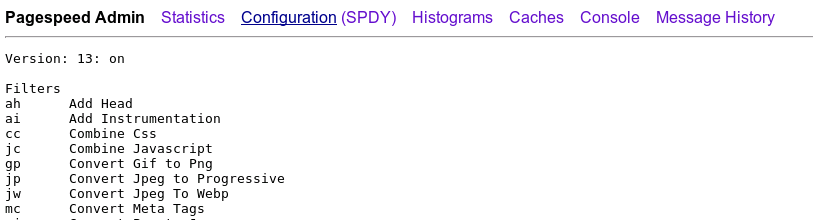
The name of the currently active page is underlined in the top navigation bar.
[TABLE]
Before 1.8.31.2, the main admin page is not available, but there
are page-specific handlers for statistics, messages, and the
console. In 1.8.31.2 and later, the *_pagespeed_* handlers, such
as mod_pagespeed_statistics, will continue to be supported:
- They provide read-only access to server operation. There may be cases where a site owner wants to share statistics or console information but not the ability to purge the cache.
- Existing configurations must continue to work after an upgrade to a release that supports pagespeed_admin.
- The admin pages may later gain support for modifying the server state
Configuring Admin Pages
In this table we use the term "server" for an Apache VirtualHost and an nginx Server Block. We use the term "global" to mean the entire Apache or nginx system, covering all the configured VirtualHost and Server Blocks.
| Apache Handler | Nginx Option | Version | Description |
|---|---|---|---|
pagespeed_admin |
AdminPath |
1.8.31.2+ | Covers all administrative functions for |
| a host in one handler. If you establish this handler, | |||
| you don't need any of the other server-scoped methods. Only | |||
| give 'admin' page access to clients that you are comfortable | |||
| allowing to modify the state of your PageSpeed configuration. | |||
pagespeed_global_admin |
GlobalAdminPath |
1.8.31.2+ | Covers all administrative functions for |
| the entire global state in one handler. If you establish this | |||
| handler, you don't | |||
need mod_pagespeed_global_statistics. |
|||
mod_pagespeed_statistics |
StatisticsPath (1.8.31.2+) |
All | Launchpad for Statistics, Histograms, and |
| a subset of the Caches page as described above. | |||
mod_pagespeed_global_statistics |
GlobalStatisticsPath (1.8.31.2+) |
1.1+ | Same as above, but aggregates statistics across all |
| configured servers. You must enable | |||
UsePerVHostStatistics for separate global |
|||
| statistics to be retained, otherwise all statistics will be global. | |||
mod_pagespeed_message |
MessagesPath (1.8.31.2+) |
1.0+ | Displays recent log messages printed by PageSpeed, |
| including messages that may be below the current server loglevel | |||
| threshold such as "Info" messages. Requires that | |||
MessageBufferSize be set. |
|||
pagespeed_console |
ConsolePath (1.8.31.2+) |
1.6+ | Displays a console of graphs |
| of server optimization behavior over time. |
Establishing Handlers in Apache
Each handler is optional; add them individually to enable
admin features. Note that when you add handlers for
pagespeed_admin and pagespeed_global_admin
you are granting read/write access to server-state. The other handlers
are read-only. A sample handler that filters on IP address is
in the default configuration, whose general form is:
<Location /PATH>
   Order allow,deny
   Allow from localhost
   Allow from 127.0.0.1
   SetHandler HANDLER_NAME
</Location>
You can choose any path for a handler, but you must specify the handler
name exactly as it appears in the table above. By convention we use
use the handler name for the path. You may also want to
employ login-based access to the admin pages, using
AllowOverride AuthConfig. Please see the Apache
2.2
or
2.4
Documentation for details.
Establishing Handlers in Nginx
In nginx, the handlers must be specified as location blocks.
location /ngx_pagespeed_statistics { allow 127.0.0.1; deny all; }
location /ngx_pagespeed_global_statistics { allow 127.0.0.1; deny all; }
location /ngx_pagespeed_message { allow 127.0.0.1; deny all; }
location /pagespeed_console { allow 127.0.0.1; deny all; }
location ~ ^/pagespeed_admin { allow 127.0.0.1; deny all; }
location ~ ^/pagespeed_global_admin { allow 127.0.0.1; deny all; }
Note that these handlers must precede the
"\.pagespeed\.([a-z]\.)?[a-z]{2}\.[^.]{10}\.[^.]+" location block.
In version 1.8.31.2 and later, the above location blocks are needed for each path you elect to enable in PageSpeed options:
pagespeed StatisticsPath /ngx_pagespeed_statistics;
pagespeed GlobalStatisticsPath /ngx_pagespeed_global_statistics;
pagespeed MessagesPath /ngx_pagespeed_message;
pagespeed ConsolePath /pagespeed_console;
pagespeed AdminPath /pagespeed_admin;
pagespeed GlobalAdminPath /pagespeed_global_admin;
You can choose any path, as long as it's consistent between
the pagespeed Path and the location. By
convention we use the names as specified in the example.
Prior to version 1.8.31.2, the above "Path" settings do not exist,
and the failure to specify location blocks leaves the paths active
with no access restrictions. The module will service requests
to the paths whether the location blocks are specified or not.
This applies to /ngx_pagespeed_statistics,
/ngx_pagespeed_global_statistics,
/ngx_pagespeed_message, and /pagespeed_console.
If you define access control for /pagespeed_admin or
/pagespeed_console, you must do so earlier in the configuration
file than the path to handle .pagespeed resources, to ensure
that the handlers are disambiguated.
Limiting Handler Access
Note: New feature as of 1.10.33.0
Apache's SetHandler access controls are accessible to anyone who can
modify .htaccess files, so in a typical shared hosting context
the global admin site isn't sufficiently protected. As of 1.10.33.0,
PageSpeed allows setting an additional restriction of what domains are allowed
to load handlers. For example, to deny access entirely, you could put:
Apache:
ModPagespeedStatisticsDomains Disallow *
ModPagespeedGlobalStatisticsDomains Disallow *
ModPagespeedMessagesDomains Disallow *
ModPagespeedConsoleDomains Disallow *
ModPagespeedAdminDomains Disallow *
ModPagespeedGlobalAdminDomains Disallow *
Nginx:
pagespeed StatisticsDomains Disallow *;
pagespeed GlobalStatisticsDomains Disallow *;
pagespeed MessagesDomains Disallow *;
pagespeed ConsoleDomains Disallow *;
pagespeed AdminDomains Disallow *;
pagespeed GlobalAdminDomains Disallow *;
To allow access only to an admin, define a new VHost
like admin.example.com, use standard web-server access control
(IP or password) to restrict access to only that admin, and then at the top
level of your config put:
Apache:
ModPagespeedStatisticsDomains Allow admin.example.com
ModPagespeedGlobalStatisticsDomains Allow admin.example.com
ModPagespeedMessagesDomains Allow admin.example.com
ModPagespeedConsoleDomains Allow admin.example.com
ModPagespeedAdminDomains Allow admin.example.com
ModPagespeedGlobalAdminDomains Allow admin.example.com
Nginx:
pagespeed StatisticsDomains Allow admin.example.com;
pagespeed GlobalStatisticsDomains Allow admin.example.com;
pagespeed MessagesDomains Allow admin.example.com;
pagespeed ConsoleDomains Allow admin.example.com;
pagespeed AdminDomains Allow admin.example.com;
pagespeed GlobalAdminDomains Allow admin.example.com;
Now when you visit admin.example.com/pagespeed_global_admin
you'll see global (server-level) admin information, but users are not able to
access this under their own domain or turn the handler on
with .htaccess.
For all six of these options the default value is Allow *. If
you explicitly Allow access to any site, all others are
automatically Disallowed. Wildcards are allowed, and additional
directives are applied in sequence. For example, consider the following
config:
Apache:
ModPagespeedAdminDomains Allow *.example.*
ModPagespeedAdminDomains Disallow *.example.org
ModPagespeedAdminDomains Allow www.example.org
Nginx:
pagespeed AdminDomains Allow *.example.*;
pagespeed AdminDomains Disallow *.example.org;
pagespeed AdminDomains Allow www.example.org;
This would allow access to www.example.com/pagespeed_admin,
and www.example.org/pagespeed_admin but
not shared.example.com/pagespeed_admin.
Shared Memory Statistics
By default PageSpeed collects cross-process statistics. While
they're mostly intended for debugging and evaluation
using /mod_pagespeed_statistics, /ngx_pagespeed_statistics,
and the PageSpeed Console, statistics are also
necessary for limiting concurrent image rewrites
and background fetches.
It's not recommended to turn them off, as their performance impact
is minimal, but if you need to you can do so with:
Apache:
ModPagespeedStatistics off
Nginx:
pagespeed Statistics off;
Virtual hosts and statistics
You can choose whether PageSpeed aggregates its statistics
over all virtual hosts (the default), or to keeps separate counts for each. You
can chose the latter by specifying
UsePerVHostStatistics on. In that
case, /pagespeed_admin, /mod_pagespeed_statistics
and /ngx_pagespeed_statistics will show the data for
whatever virtual host is being accessed. If you do turn per-virtual
host statistics on, you can still access the aggregates
under /pagespeed_global_admin, /mod_pagespeed_global_statistics
or /ngx_pagespeed_global_statistics.
Apache:
ModPagespeedUsePerVhostStatistics on
Nginx:
pagespeed UsePerVhostStatistics on;
Message Buffer Size
Determines the number of bytes of shared memory to allocate as a circular buffer for holding recent PageSpeed log messages. By default, the size of this buffer is zero, and no messages will be retained.
Apache:
ModPagespeedMessageBufferSize 100000
Nginx:
pagespeed MessageBufferSize 100000;